Pochi Doesn't Have to Be Stupid
M-Pesa Pochi La Biashara is marketed as the simple, free business wallet. It separates your business funds, gives you a clean statement, and is dead easy to set up. But compared to STK Push integration, Pochi seems "dumb"—it doesn't talk to your order management system. You get a list of payments with no order context, and reconciliation is manual.
But what if we told you there's a way to use Pochi's strengths (free, simple, separate float) while automatically feeding its transactions into a smart dashboard? This is the "Pochi Loophole," and it's a legitimate hybrid strategy for Kenyan SMEs.
The Problem: Pochi Is a Black Box
By default, Pochi transactions are just entries in your M-Pesa statement: "Customer paid KSh 1,500." No order number, no customer name, no product reference. If you're running an online store and a customer pays via Pochi, you have to manually match the payment to the order by asking for a screenshot. That's the same old WhatsApp Till Number headache.
The Loophole: Unique Reference Numbers + Parsing
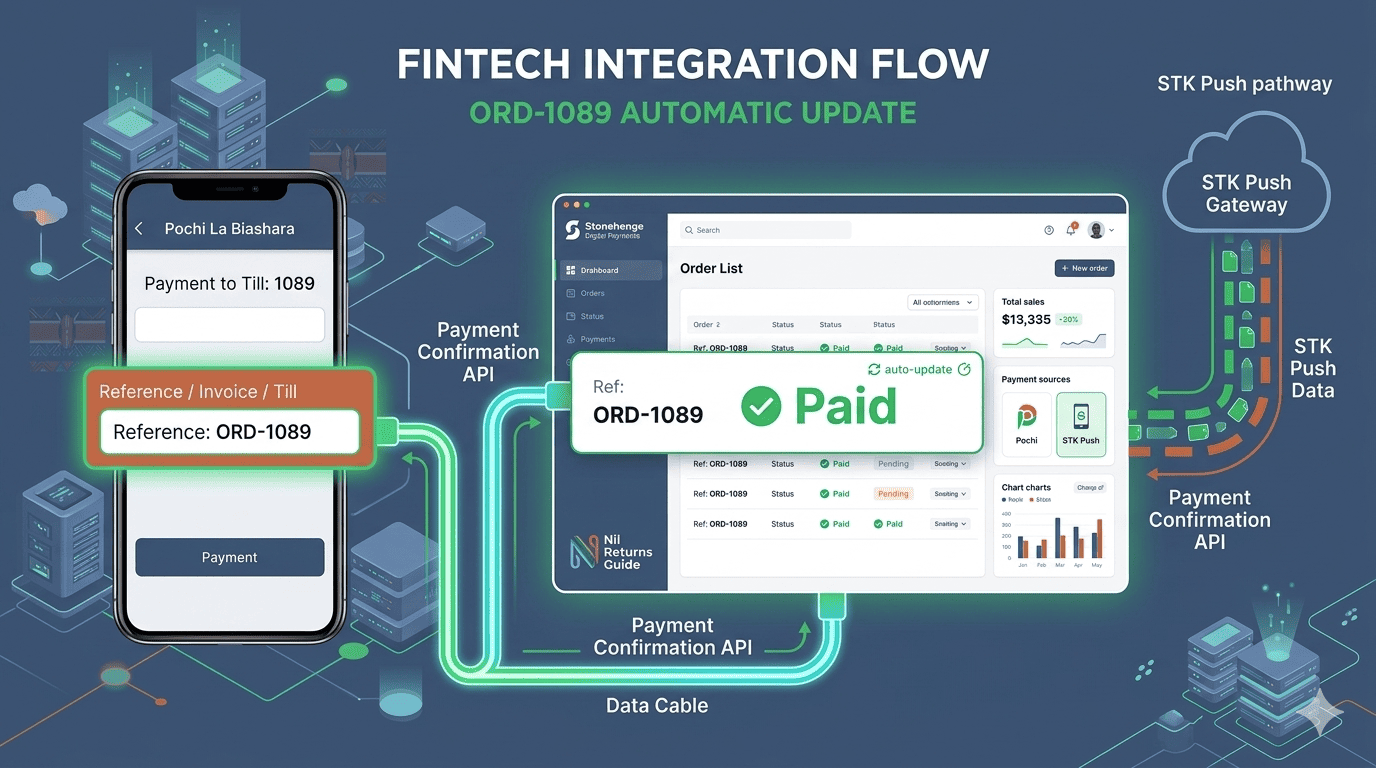
Here's the trick: When a customer places an order on your website, you generate a unique, short reference code—like "ORD-1089" —and you instruct the customer to include that code in the M-Pesa payment message when sending to your Pochi Till.
On the website checkout, the instruction is clear: "Step 1: Go to M-Pesa > Lipa Na M-Pesa > Pochi La Biashara. Step 2: Enter Till Number 987654. Step 3: Enter Amount KSh 1,500. Step 4: In the 'Reference' or 'Message' field, type ORD-1089."
Then, your Stonehenge Digital dashboard connects to the Safaricom API (or parses the Pochi statement) and scans incoming payments for these reference codes. When it finds a payment with "ORD-1089", it automatically marks that order as "Paid" and triggers the fulfillment workflow.
The Pochi + STK Push Hybrid
You can offer both payment methods on your checkout:
- Option 1: "Fast M-Pesa STK Push (Auto-Detect) – Small transaction fee."
- Option 2: "Pay via Pochi La Biashara (Free, but requires entering order code)."
Price-sensitive customers will take the extra step to save the fee. Convenience-focused customers will choose STK. Both flows feed the same dashboard.
The Limitation
This works beautifully for B2C where the transaction fee savings are meaningful, and where the customer is willing to type a short code. It's not ideal for B2B or high-value transactions where a mistake in the reference code could cause reconciliation headaches. Use with clear communication.
Pochi doesn't have to be a black box. With a little clever engineering, it becomes a free collection pipe feeding a smart system.
Interested in E-Commerce Website with M-Pesa?
Let's build this for your business
Sell to any Kenyan with a phone. Full online shop with Safaricom STK Push payment — no card needed.