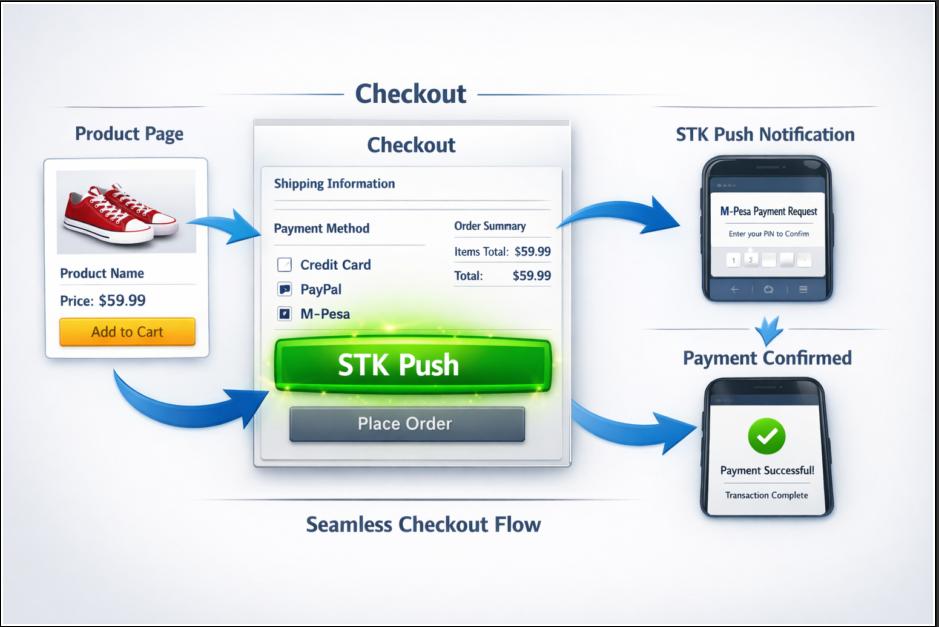
What is STK Push?
STK Push, formally called Lipa Na M Pesa Online, is Safaricom's API that allows businesses to initiate a payment request directly from a website or app to a customer's phone.
The customer receives a pop up prompt asking them to enter their M Pesa PIN, and the payment is processed instantly.
You have experienced this dozens of times
STK Push is already part of daily life in Kenya. You have used it without thinking about the name.
- Everyday example Paying for an Uber ride
- Everyday example Topping up a KPLC token online
- Everyday example Paying school fees through a web portal
That seamless experience is STK Push. The site asks, the phone prompts, the customer enters a PIN, and the payment clears in seconds.
Why does it matter for your business?
The payment options you accept decide how many customers can actually finish a purchase. In Kenya, those numbers are not close.
What customers can actually use
If your online shop only accepts cards, you are turning away the majority of your potential customers before they even reach checkout.
The technical flow, simplified
Here is what happens behind the scenes when a customer pays on a Stonehenge KE e commerce website. Seven steps, and most of them happen in under half a minute.
From checkout to confirmed order
- Customer enters their Safaricom number at checkout.
- Our server sends a payment request to Safaricom's Daraja API.
- Safaricom sends an STK Push prompt to the customer's phone.
- Customer enters their M Pesa PIN.
- Safaricom confirms the payment to our server via a callback.
- The order is confirmed and the customer sees a success page.
- Both the customer and merchant receive M Pesa confirmation SMS.
What do you need as a business owner?
Before any code is written, you need one thing from Safaricom: a business payment number.
One of these two numbers
If you do not have one, Safaricom's business team can register you. The process takes approximately 5 to 7 business days.
Who handles what
You do not need to understand the API. That is our job. But there are a few things only you can do.
What only you can handle
- Apply for and obtain your Till or Paybill number
- Keep your Safaricom business details up to date
- Confirm which amounts and products are payable online
- Decide how refunds and failed payments are handled
What we take care of
- Daraja API integration and credentials setup
- STK Push trigger from your checkout page
- Secure callback handling and order confirmation
- Success, failure and timeout states for the customer
Why this matters more than a card checkout
A customer without a card cannot buy from a card only store, no matter how good the product page is. Every abandoned cart caused by a missing payment method is a sale that was never really available.
- Fewer steps between interest and payment
- No card details to type on a small screen
- No redirect to a separate payment page
- Confirmation the store can verify automatically
- A receipt the customer already recognises
Ready to accept M Pesa on your website?
Stonehenge Digital builds e commerce checkouts with M Pesa STK Push wired in, from the first prompt on the phone to the confirmed order on your dashboard.
Explore the E-Commerce Website with M Pesa →Interested in E-Commerce Website with M-Pesa?
Let's build this for your business
Sell to any Kenyan with a phone. Full online shop with Safaricom STK Push payment — no card needed.
11 Comments
Hellen Nyambura
06 Apr 2026
We are a restaurant. Delivery payments via STK Push reduced cash handling.
Joseph Ngugi
06 Apr 2026
Stonehenge integrated STK Push for our e-commerce site. Best decision ever.
Esther Muthoni
06 Apr 2026
The M-Pesa confirmation SMS from both sides builds trust.
Florence Ndanu
06 Apr 2026
We are a laundry business. Online payment via STK Push increased prepaid orders.
Chris Ayienda
06 Apr 2026
The seamless experience is why I prefer STK Push over bank transfers.
Margaret Nthenya
06 Apr 2026
We are a boutique. Our Instagram shop links to STK Push payment. Game changer.
Gladys Atieno
06 Apr 2026
The pop-up prompt is so intuitive even my 70-year-old mother uses it.
Kevin Omondi
06 Apr 2026
The no extra apps requirement is huge. Customers hate downloading new apps.
Benson Kipkorir
06 Apr 2026
We are a electronics shop. Customers pay deposits for high-value items.
John Mutua
06 Apr 2026
I love how you said "you don't need to understand the API." That's real honesty.
Timothy Kipruto
06 Apr 2026
Safaricom should teach every business owner about this. So many still don't know.