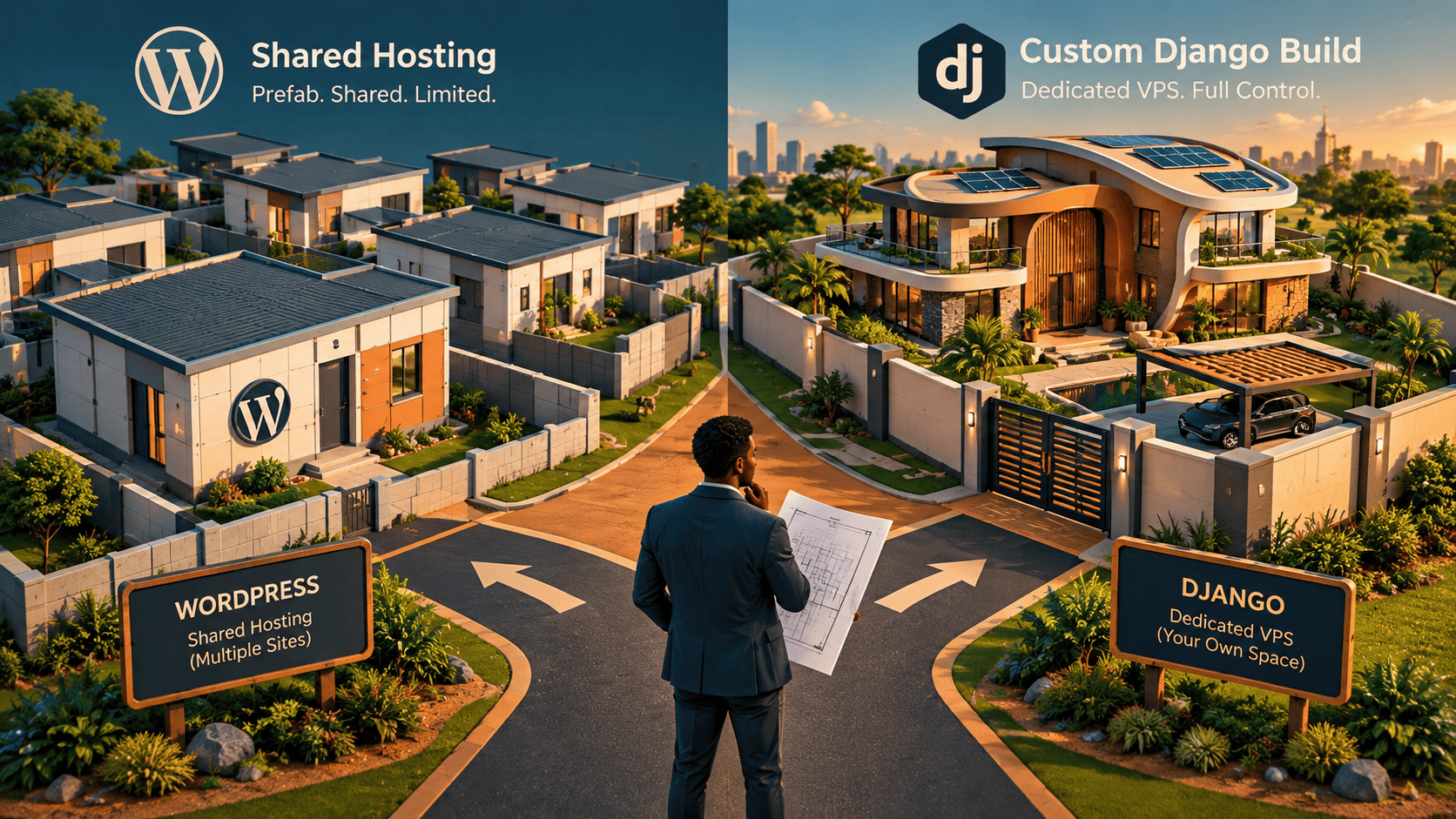
The Decision You Make Once (And Live With Forever)
Every Kenyan business owner eventually faces the same question. You need a website. A developer sends you a quote. Another sends a different quote. One talks about "WordPress." The other mentions "Django" and "VPS" and something about Python. You nod along, pretending to understand, and then you make a decision based on one thing: price.
Six months later, you're either celebrating a system that runs your business like clockwork, or you're trapped in a platform that fights you at every turn, quietly costing you tenders, sales, and sleep.
This guide is for the business owner who wants to make that decision once — and make it right. No jargon. No technical hand-waving. Just a clear framework you can use today.
The House Analogy (Start Here)
Forget code for a moment. Think about buildings.
WordPress Is a Pre-Fabricated Home
You buy it ready-made. It comes with standard rooms, standard wiring, and standard plumbing. You can repaint the walls, choose your own furniture, and add a standard extension. It's fast to move into, it's affordable, and for most families, it's perfectly comfortable.
But try to add a basement, or a curved staircase, or an industrial-grade kitchen. Suddenly, the walls don't line up. The contractor has to hack things. It works, but it's ugly, and the structure never quite feels right.
Custom Django on VPS Is Custom Architectural Engineering
Every blueprint, every wall, every security system, and every utility is designed for your specific needs. It takes longer. It costs more upfront. But you get complete freedom, structural strength that doesn't crack under pressure, and unlimited room to grow without hitting a ceiling.
Now: Which kind of house does your business actually need?
Let's find out.
The Six Differences That Actually Matter
There are dozens of technical differences between WordPress and Django. But for a business owner, only six of them affect your money, your risk, and your growth. Here they are, one by one.
Difference 1: Customisation and Complex Business Logic
WordPress: Excellent Within Its Lane
WordPress is brilliant at standard layouts. A company website? Perfect. A blog? Built for it. A news site? Ideal. A traditional online store selling physical products? Very capable.
You add features using plugins — pre-made software modules. Need a contact form? There's a plugin. Need SEO tools? There's a plugin. Need a booking calendar? There's a plugin.
But here's the wall you'll eventually hit:
When your business needs a workflow that doesn't exist in any plugin — a unique commission structure, a multi-tiered approval process, a proprietary dashboard, a custom calculation engine — you're now forcing a square peg into a round hole. Developers start "hacking" WordPress. They write custom code on top of a system that wasn't designed for it. It works, but it's fragile. And every WordPress update threatens to break it.
Django: Built for Logic That Doesn't Exist Yet
Django is a software framework designed specifically for custom business logic. There are no "plugins" — because there are no pre-made limits.
If your business has:
- Unique algorithms or pricing models
- Tailored reporting dashboards
- Automated back-office workflows
- Multi-tiered user permissions (e.g., owner, manager, cashier, auditor)
- Proprietary client portals
...then Django handles it cleanly, without workarounds, without hacks, without structural limits.
Kenyan Example: A matatu SACCO needs a system where route managers can log daily collections, the treasurer can verify, the chairman can approve payouts, and an auditor can pull reports — all with different permissions and a complete audit trail. No WordPress plugin does this. Django builds it exactly to spec.
Difference 2: Speed and Performance
WordPress: Fast — Until It Isn't
A basic WordPress site can load quickly. But add 15 plugins, a heavy theme, a chat widget, three tracking scripts, and an image gallery, and you've built a website that takes 8 seconds to load on a Nairobi 4G connection.
The fix is "optimisation" — caching plugins, image compression, content delivery networks. It works, but it's a constant battle. Every new feature adds weight.
Django: Fast by Design
Django is fast out of the box. There's no bloat, no unnecessary background plugins, no code you didn't ask for. Pages and database queries execute in milliseconds.
When traffic spikes — a flash sale, a viral post, a tender deadline rush — Django handles it without flinching. It's the reason platforms like Instagram and NASA run on it.
Why this matters for you: We established earlier that procurement officers give your site less than 9 seconds. A fast site isn't a luxury. It's a filter that decides whether you get evaluated at all.
Difference 3: Security and Safety
WordPress: The World's Biggest Target
WordPress powers over 40% of the world's websites. That popularity makes it the number one target for automated hacker bots. Millions of bots scan for vulnerable WordPress sites every single day.
Your security depends heavily on two things:
- Keeping every plugin updated (and hoping the plugin developer is diligent)
- Trusting that the plugin developer writes secure code (many don't)
A single outdated plugin can expose your customer data, your M-Pesa integration, and your business reputation.
Django: Enterprise-Grade by Default
Django was built by a newsroom that needed security as a first principle. It includes built-in protection against the most common cyber threats:
- Cross-site scripting (XSS)
- SQL injection
- Clickjacking
- Cross-site request forgery
These protections are not add-ons. They're on by default. You don't have to remember to install them.
Why this matters for you: If you're handling customer phone numbers, M-Pesa transactions, patient records, or client contracts, a breach isn't just embarrassing — it's a legal liability under Kenya's Data Protection Act.
Difference 4: Hosting — Shared Hosting vs Dedicated VPS
WordPress: Usually Shared Hosting
Most WordPress sites run on shared hosting. This is cheap and easy — but your website shares CPU, RAM, and bandwidth with hundreds of other websites on the same server.
If a neighbouring site gets a traffic spike or gets hacked, your site slows down too. You have no control over your neighbours.
Think of it like renting an apartment in a crowded block. Cheap, convenient — but you can't control the noise next door.
Django on VPS: Your Own Private Server
A Virtual Private Server (VPS) is your own isolated, private server environment in the cloud. You have dedicated CPU, memory, and bandwidth.
Think of it like owning a standalone home on its own plot. Total control, total privacy, guaranteed performance.
Why this matters for you: If your website is generating revenue, handling sensitive data, or supporting critical operations, shared hosting is a liability. A VPS is an insurance policy.
Difference 5: Content Management and Usability
WordPress: Unbeatable for Everyday Content Editing
This is WordPress's superpower. A non-technical staff member can log in, draft a blog post, swap a banner image, edit page copy, and publish — all without touching a line of code.
For marketing teams that need to move fast, WordPress is genuinely excellent. Nobody disputes this.
Django: A Clean, Purpose-Built Admin Panel
Django includes an auto-generated admin dashboard. It's not a drag-and-drop page builder. It's a structured data management interface.
It shows only the exact data and records your business needs. No clutter, no plugin menus, no confusing settings pages. If your staff needs to view orders, update inventory, approve payments, or add a new product, it's all there — organised logically.
The honest trade-off: If your team needs to redesign page layouts weekly, WordPress wins. If your team needs to manage records and processes efficiently, a well-designed Django admin is cleaner.
Difference 6: Maintenance and Long-Term Stability
WordPress: Continuous Maintenance Required
WordPress sites need ongoing attention:
- Core updates
- Theme updates
- Plugin updates (sometimes weekly)
- Security patching
And here's the painful part: occasionally, updating one plugin breaks another. Your site goes down. Your contact form stops sending. Your checkout breaks. You spend the day troubleshooting something that was working yesterday.
This is not a rare edge case. It's a routine reality of running a WordPress site long-term.
Django: Stable and Predictable
Once a Django application is built, its code dependencies rarely change or break unexpectedly. Upgrades are predictable, controlled, and managed systematically by developers on a schedule — not triggered by a third-party plugin you've never met.
Why this matters for you: Stability means you're not losing revenue to random breakages. It means your team isn't distracted by firefighting. It means your system works the same way next month as it does today.
The At-a-Glance Comparison Matrix
Here's everything in one table. Save this. Screenshot it. Send it to your board.
| Feature / Factor | WordPress Website | Custom Django + VPS |
|---|---|---|
| Best Used For | Standard business sites, blogs, brochure websites, standard e-commerce | Custom web applications, SaaS platforms, portals, heavy data apps |
| Build Flexibility | High within existing templates & plugins | 100% unrestricted custom code & custom logic |
| Performance & Speed | Moderate to fast (requires optimisation) | Blazing fast native performance |
| Security Level | Standard (requires active security plugins) | Enterprise-grade (built-in security standards) |
| Hosting Control | Shared or managed WP hosting | Dedicated Virtual Private Server (VPS) control |
| Non-Tech Content Editing | Extremely easy visual drag-and-drop | Custom tailored, clean administration portal |
| Long-Term Stability | Requires regular plugin/theme updates | High code stability with minimal maintenance breakage |
| Scalability Potential | Moderate (can struggle under complex custom loads) | High (scales seamlessly to millions of users) |
So Which One Is Right for Your Project?
Here is the decision framework. Read both lists carefully. One of them will describe your situation almost word for word.
Choose WordPress If:
- You need a standard company website, blog, news site, or standard online store — quickly. If you need to be live in two weeks and you're selling standard products or services, WordPress is the efficient choice.
- Your non-technical marketing or admin staff need to frequently create and modify page layouts using visual drag-and-drop tools. If your team's core need is publishing content fast, WordPress serves that brilliantly.
- Your project relies on standard features that off-the-shelf plugins handle perfectly. Contact forms, SEO tools, basic e-commerce, image galleries, newsletters — these are solved problems in WordPress.
- Your budget is tight and your requirements are simple. A well-built WordPress site can cost a fraction of a custom build, and if your needs don't exceed its limits, that's a smart, rational decision.
Choose Custom Django on VPS If:
- You are building a custom web application, SaaS product, client portal, or data dashboard with unique business logic. If your system does something no one else's system does, you need a framework built for originality.
- You require high speed, top-tier security, and dedicated server resources isolated from other websites. If downtime or a data breach would be catastrophic, this is non-negotiable.
- You need complete ownership, custom API integrations (like M-Pesa, specialised ERPs, or payment gateways), and freedom from third-party plugin limits. When you own the code, you own the roadmap.
- You want a scalable system built to handle growing database demands and complex user workflows. If you're planning to grow from 100 users to 100,000, build on a foundation that won't crack.
Three Kenyan Scenarios (So You Can See Yourself)
Scenario 1: The Law Firm in Upper Hill
They need a professional website with practice areas, team profiles, case studies, and a compliance page. They publish articles monthly. They receive enquiries via a contact form.
Verdict: WordPress. Standard requirements. Fast to build. Easy for the marketing assistant to update. No need for custom engineering.
Scenario 2: The Logistics Company with 40 Riders
They need a dispatch dashboard, rider performance tracking, customer tracking links, automated M-Pesa reconciliation, and multi-branch inventory visibility. Each rider has a login. Each client has a portal.
Verdict: Custom Django on VPS. No plugin stack handles this cleanly. The business logic is unique. The security requirements are high. The scale demands a VPS.
Scenario 3: The Agrovet Chain with 5 Branches
They need to track stock across branches, manage supplier purchase orders, record farmer credit sales, generate eTIMS-compliant invoices, and produce branch-level profit reports. The owner needs to see everything from his phone.
Verdict: Custom Django on VPS. This is a business management platform, not a website. WordPress would fight them every step of the way.
The Cost Question (Be Honest About It)
Let's talk money, because that's the real deciding factor for most Kenyan SMEs.
Indicative WordPress Costs
- Build: KSh 30,000 – KSh 150,000 (depending on complexity and developer)
- Hosting: KSh 5,000 – KSh 20,000 per year
- Premium plugins/themes: KSh 10,000 – KSh 50,000 per year
- Ongoing maintenance: KSh 3,000 – KSh 10,000 per month (if outsourced)
Indicative Django + VPS Costs
- Build: KSh 250,000 – KSh 2,000,000+ (heavily dependent on scope)
- VPS Hosting: KSh 20,000 – KSh 100,000 per year
- Ongoing maintenance: KSh 10,000 – KSh 40,000 per month (for a serious application)
Here's the trap: Most business owners compare only the "build" number. They choose WordPress because KSh 80,000 looks better than KSh 600,000.
But then two years later, they've paid:
- KSh 200,000 in developer workarounds to force WordPress to do something it wasn't built for
- KSh 150,000 in lost sales from a slow, broken site
- KSh 100,000 in emergency fixes after a plugin conflict crashed the site
- And they still don't have the system they actually needed
That's the real cost of choosing the wrong platform. Not the invoice. The opportunity lost.
The Decision Process (Do This Before You Sign Anything)
Step 1: Write down every feature your business needs. Be specific. "Customer portal" is vague. "Customers can log in, view their past orders, download invoices, and request a repeat delivery" is specific.
Step 2: For each feature, ask: "Does this exist as a standard plugin?" If 80%+ of your features are standard, WordPress is viable. If less than half are standard, you're heading toward custom territory.
Step 3: Ask: "Will this system run my business operations, or will it just market my business?" If it's marketing, WordPress. If it's operations, Django.
Step 4: Ask: "What happens if this system goes down for 6 hours?" If the answer is "we post tomorrow instead," WordPress is fine. If the answer is "we can't deliver orders, process payments, or serve clients," you need the reliability of a VPS.
Step 5: Ask: "Where will this business be in 3 years?" If you're planning to scale significantly, add users, integrate with other systems, or sell the business one day, build on a foundation that supports that ambition.
The Summary (In One Paragraph)
If your project is a standard marketing website, WordPress is efficient, affordable, and accessible — and you should use it without guilt. But if your project is a custom business application, platform, or proprietary software tool, a custom Django build on a dedicated VPS delivers superior security, performance, and long-term business value that compounds over years. Choose based on what your business needs to do, not on what the first quote costs.
Still Not Sure? Let's Talk It Through.
We build both — and we'll tell you honestly which one your business actually needs. No upselling. No jargon. Just a straight answer and a clear plan.
Interested in Business Management System?
Let's build this for your business
Replace spreadsheets, paper records, and WhatsApp chaos with a custom system built for exactly how your business works.