The Open Door to Chaos
Your "Contact Us" page has a simple form: Name, Email, Phone, Message. It's been there for three years. It receives about 15 submissions a month. Sounds great, right? But when you look closely: 6 are spam from overseas SEO agencies, 3 are job applications (when you're not hiring), 4 are vague "I need help" messages with no details, and only 2 are actual, qualified enquiries.
Your contact form is wasting your time and letting poor leads through while frustrating good leads who don't know what to say. It's your most dangerous page. But with a few strategic changes, it can become your most powerful lead qualification machine.
The Problem with Generic Contact Forms
A blank "Message" box invites blank messages. It puts the burden on the visitor to articulate their needs, which many can't or won't do. Good leads might leave because they don't know what information you need. Bad leads flood you with noise.
The Stonehenge Digital "Smart Contact" Form
1. Start with a "Who Are You?" Dropdown
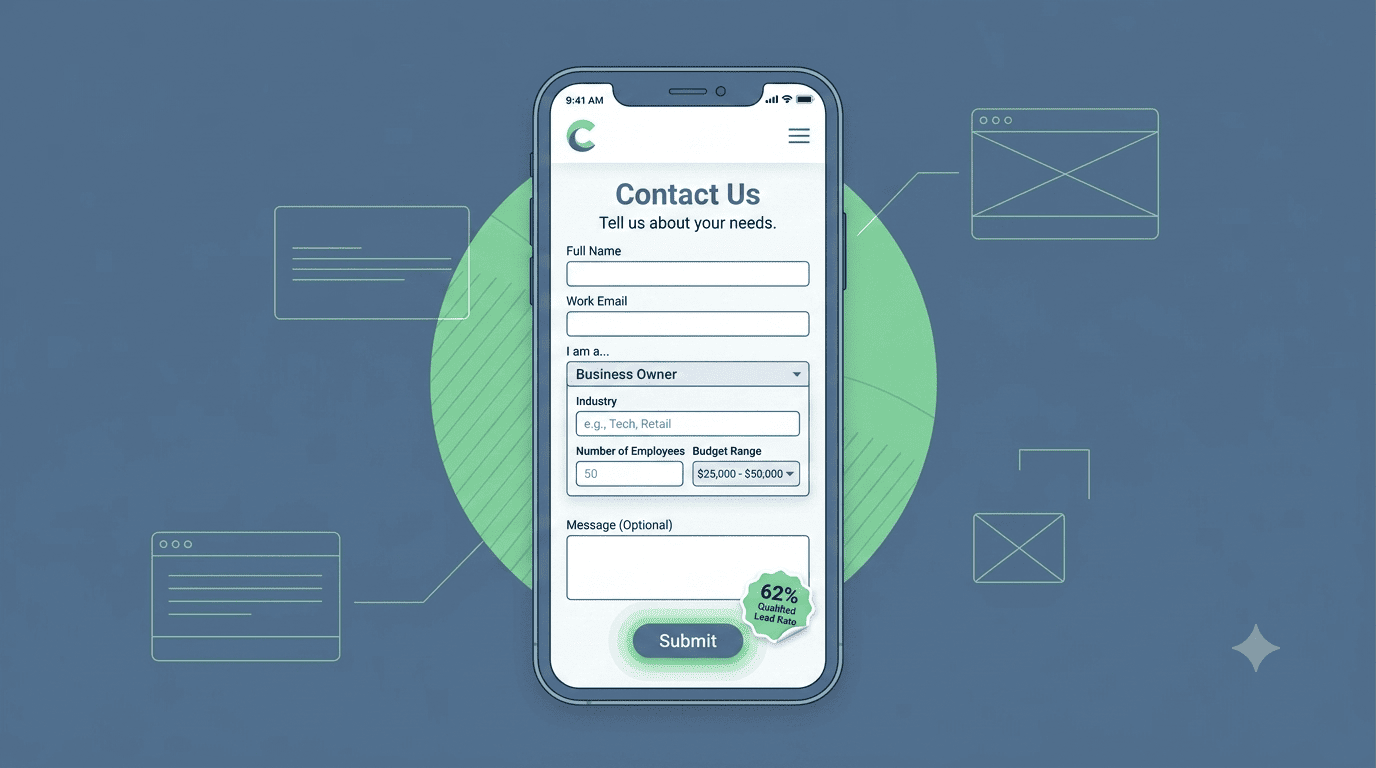
Instead of a blank form, the first field is a dropdown: "I am a..." (Select one) Options: "Procurement Officer", "Business Owner", "NGO Program Manager", "Individual Client", "Job Seeker" (this one auto-routes to a careers page, not your inbox). This segments the lead instantly.
2. Conditional Logic: Ask Relevant Follow-Ups
Based on their selection, the form adapts. If "Procurement Officer," new fields appear: "Tender Reference Number (if applicable)", "Approximate Budget Range", "Deadline". If "Business Owner": "Number of Employees", "Industry", "What is your biggest operational challenge right now?". This pre-qualifies the lead and gives your team the context they need before they even reply.
3. Replace "Message" with Specific Prompts
Instead of a single text box, provide 3-4 specific questions: "1. What service are you interested in? 2. What is your timeline? 3. What's your biggest concern or question?" This structures the enquiry and makes it easy for the client to provide useful information.
4. Add a "Budget Range" Field (The Ultimate Filter)
This is controversial but powerful. A simple dropdown: "Indicative Project Budget: Under KSh 100K | KSh 100K-500K | KSh 500K-2M | Over KSh 2M | Not Sure." It filters out budget mismatches early, saving you and the client weeks of fruitless discussion. Clients who select a range are also signalling serious intent.
5. Auto-Response with Next Steps
After submission, the page displays a tailored message: "Thank you, [Name]. A member of our team will review your enquiry and respond within 4 business hours. In the meantime, you might find our [relevant case study] helpful." This sets expectations and keeps them engaged.
The Result
One of our clients, a management consultancy, switched from a generic form to this smart form. Their spam submissions dropped to near zero. Their qualified lead rate went from 13% to 62%. And their team saved 5 hours a week not replying to "I need help" messages that went nowhere.
Your Contact Us page should be a gatekeeper, not an open door. Turn it into a lead qualification machine.
Interested in Portfolio & Organisational Website?
Let's build this for your business
A professional, mobile-first website that makes your business look credible and gets found on Google.