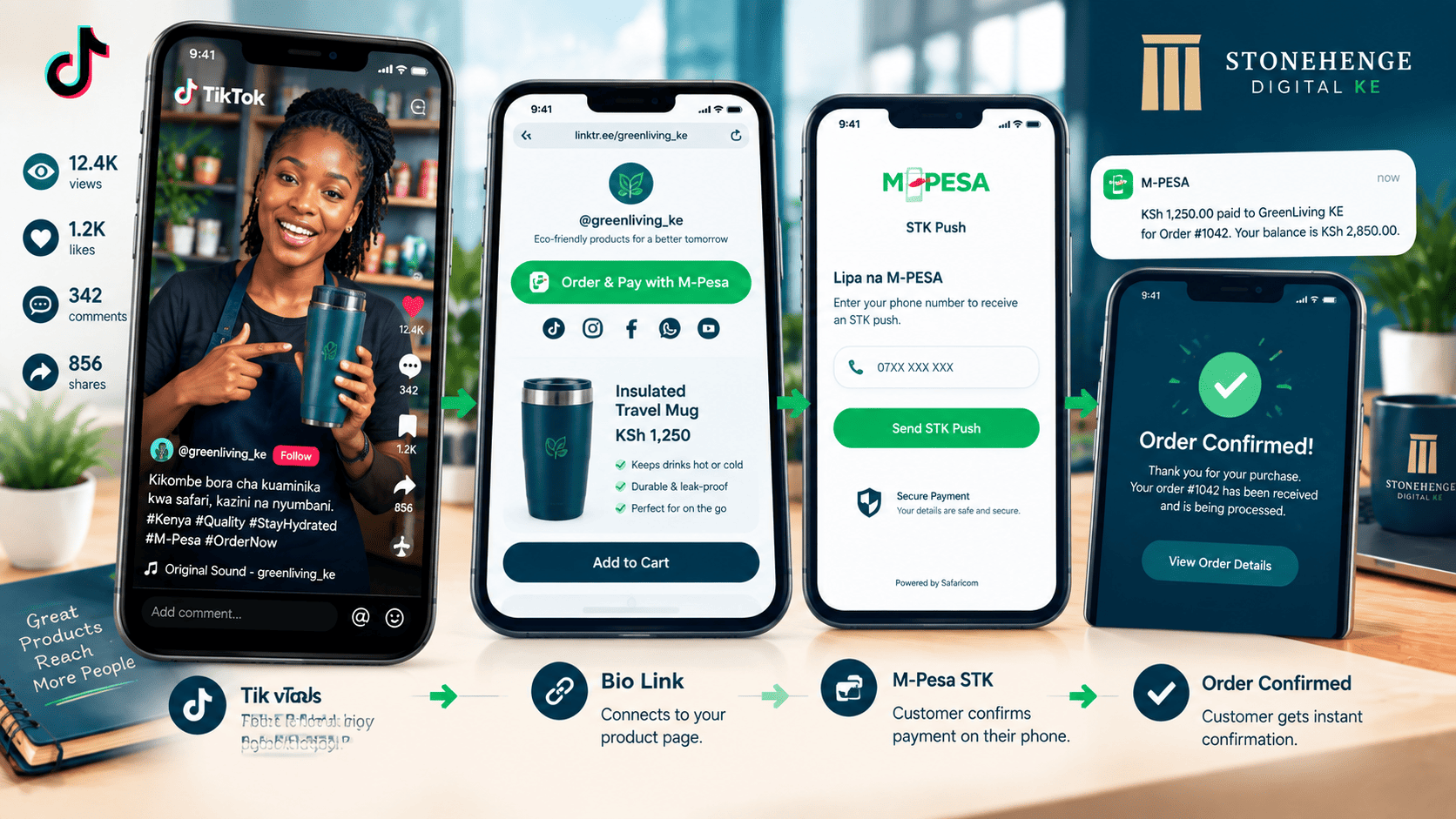
The TikTok-to-Sale Funnel
TikTok is the fastest growing social platform in Kenya. Millions of users scroll through short videos every day. Some of them are your potential customers.
This tutorial shows you how to turn TikTok views into sales using a simple link in bio strategy and an STK Push payment page. No full website required.
Step 1: Set up your TikTok account for business
Four steps, five minutes
- Download TikTok.
- Create an account. Use your business name as the handle, for example @SavannaLogistics.
- Switch to a Business Account in settings. This unlocks analytics and a clickable website link in your bio.
- Write a clear bio that tells people exactly what to do next.
Step 2: Create the link in bio destination
Your TikTok bio can only hold one clickable link. Everything else in the funnel depends on where that link goes.
Step 3: Create content that sells
Your videos must be authentic and show the product or service in action. These five formats work.
The real talk product demo
Hold your product. Show it. Explain what it is, what it does and the price.
"This is the new 20,000mAh power bank. Charges your phone 5 times. KSh 2,500. Link in bio to order."The behind the scenes
Show your workshop, your team packing orders or your delivery rider in action. This builds trust and humanises your brand.
The customer testimonial
Film a satisfied customer, with permission, holding your product and giving a quick review. Real people sell better than actors.
The tutorial
Show how to use your product or solve a problem. It provides value and showcases your product at the same time.
The sold update
Post after a sale to create social proof and urgency.
"Just sold this laptop! Thanks Amina. 3 more available. Link in bio."Step 4: Optimise your videos
Six things every video needs
Step 5: Drive traffic to the link
In every video, mention the link in three places. Repetition is not annoying here, it is necessary.
- Place 1 Verbally, in the video audio
- Place 2 In text overlay on screen
- Place 3 In the caption
Also use the comment section to reply to inquiries and remind people of the link.
Step 6: The payment flow
Six steps from viewing to receiving payment. Every one of them should be short enough to finish on a phone.
- Viewer taps the link in your bio.
- They land on your product page.
- They tap Buy Now, Pay with M Pesa.
- They enter their M Pesa number, receive the STK prompt, enter their PIN and pay.
- The order is confirmed. You receive a notification in your dashboard.
- You deliver or arrange pickup.
Step 7: Handle inquiries and DMs
TikTok users will DM you with questions. Respond quickly. Have a template ready so you never start from a blank message.
Fast, clear replies convert interest into sales. Slow replies lose the customer to the next video.
Step 8: Track and scale
TikTok analytics
See which videos get the most views and engagement.
Payment dashboard
Track how many orders come from TikTok. Use a unique link or coupon code so the source is clear.
Double down on what works
If a certain video style or product performs well, do more of it.
The zero website e-commerce model
You do not need a full e commerce site to start selling on TikTok. A single product page with STK Push is enough.
Start with one product, test the market, and scale from there. When the orders come in consistently, you can expand into a full catalogue with more products and more payment options.
Create your TikTok account today. Post your first video. Add the link. Sell.
Ready to turn views into sales?
Stonehenge Digital can build your product page and connect it to an M Pesa STK Push flow, so a TikTok viewer can go from interest to confirmed payment without leaving their phone.
Get My Product Page and STK Link →Interested in E-Commerce Website with M-Pesa?
Let's build this for your business
Sell to any Kenyan with a phone. Full online shop with Safaricom STK Push payment — no card needed.