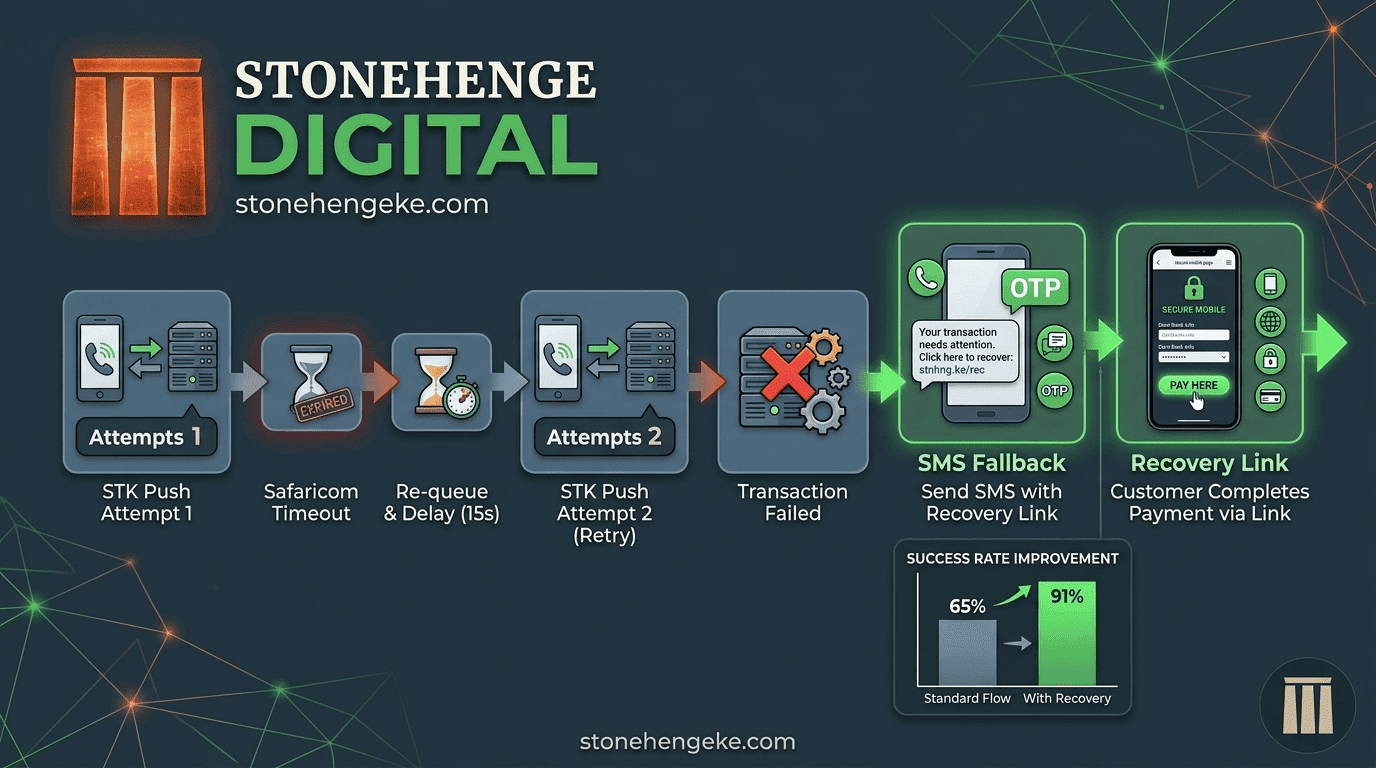
The Revenue You're Losing to Silent Failures
Up to 35% of STK Push attempts fail due to network issues, timeouts, or user distraction. Most of these failures never reach your dashboard. The customer simply leaves, and a potential sale disappears.
This tutorial shows you how to build an automated retry system that can recover some of these lost sales, give customers another opportunity to pay, and help your business maintain a more reliable checkout experience.
The opportunity
A failed payment attempt should not automatically mean a lost customer. With careful transaction tracking, safe retry handling, and timely SMS reminders, you can give customers another way to complete their purchases.
The Retry Logic: An Overview
The basic workflow gives the customer another chance to pay when the first attempt does not produce a confirmed result.
- The customer initiates an STK Push payment.
- Your system sends the payment request to Safaricom.
- If no callback is received within 60 seconds, flag the transaction for further checking.
- Wait 15 seconds while checking the transaction state.
- If the transaction is confirmed eligible for another attempt, send a second STK Push request.
- If the second attempt remains unresolved or fails, provide an SMS recovery link when appropriate.
- Log both attempts for accurate reconciliation and reporting.
Important payment safety check
A missing callback does not prove that a payment failed. The first payment may have succeeded even if the response was delayed. Before sending another STK Push, verify the transaction outcome where supported and prevent overlapping retry requests. This helps reduce the risk of duplicate payment prompts and incorrect order records.
Step 01
Store the Transaction State
Your database needs a reliable way to track every STK Push attempt. A transaction record should preserve the information your system needs to determine what happened, decide whether a retry is appropriate, and reconcile payments later.
It is also useful to store each payment attempt separately, including its request reference, response, timestamps, and final outcome. This makes troubleshooting and reconciliation much easier.
Step 02
Process the Initial Request
When the customer clicks the Pay button, your system should perform these operations:
- Create a transaction record with the status set to
initiatedand the attempt count set to 1. - Send the STK Push request to Safaricom with the configured callback URL.
- Record the request outcome and update the transaction state appropriately, using
pendingwhen a result is still awaited.
Practical tip
Save the transaction record before relying on the payment callback. Your callback handler needs a dependable record to identify the payment and update the correct order.
Step 03
Check for Timeouts with a Background Job
A scheduled background job can regularly review transactions that have remained pending for too long. For example, your job might run every 30 seconds and identify transactions whose latest attempt is older than 60 seconds.
The following pseudocode illustrates the basic decision-making process. Adapt it to your application and payment provider's supported transaction-status checks before using it in production.
Production consideration: The example is illustrative, not a drop-in implementation. Use database locking or another reliable mechanism to prevent two workers from retrying the same transaction concurrently. Also account for the time it takes to send an STK Push request, and do not mark a payment failed solely because a callback has not arrived.
Step 04
Handle Callbacks from Both Attempts
When Safaricom sends a callback, your system should validate the response and update the corresponding payment record.
Successful payment
If ResultCode is 0, record the successful payment, save the receipt number, and trigger order fulfillment only after validating the payment details.
Failed payment
If ResultCode is non-zero, record the failure details. Use the result code and the verified transaction state to determine whether another attempt is appropriate or whether the customer needs assistance.
Make Your Callback Handler Idempotent
An idempotent callback handler processes repeated notifications without creating duplicate payments, duplicate orders, or duplicate fulfillment actions.
Key safeguard:
Store and validate the M-Pesa receipt number, such as MpesaReceiptNumber, using a database uniqueness constraint where appropriate. Also use the relevant transaction and order identifiers to prevent duplicate processing.
Step 05
Add an SMS Payment Recovery Option
If the permitted retry attempts have been exhausted and the payment failure has been confirmed, an SMS can help the customer return to checkout instead of abandoning the purchase.
Example SMS
Hi [Name], we couldn't complete your M-Pesa payment for Order #[ID]. Please check your M-Pesa messages or transaction status before trying again. To continue, visit: [unique recovery link]. Need help? Reply HELP.
The recovery link should take the customer to a secure page showing the relevant order and its current payment status. A clearly labelled Retry Payment button can then start a new STK Push if the order is still unpaid and eligible for another attempt.
- Use a unique, secure recovery token rather than exposing predictable order identifiers in a payment link.
- Expire recovery links after a reasonable period and prevent their misuse.
- Recheck the order and payment state before initiating another request.
- Never tell customers that no money was deducted unless you have verified that the payment did not succeed.
Step 06
Log Every Attempt for Reconciliation
Every payment attempt, whether successful, failed, or still unresolved, should leave a useful audit trail. Good records help you understand what is happening at checkout and investigate discrepancies between payment records and orders.
Measure your recovery rate
Determine how many eligible failed or interrupted checkout sessions eventually become confirmed payments.
Identify recurring failure patterns
Check whether time of day, network conditions, request errors, or particular checkout steps are associated with higher failure rates.
Reconcile payments against orders
Match confirmed M-Pesa transactions and receipt numbers against your order records and payment reports.
Be sure to track the number of initial requests, retries, confirmed payments, unresolved transactions, and recovery-link conversions. These figures will give you a clearer view of how the system performs.
Step 07
Test the Entire Payment Flow
Before deploying your retry system, test the expected outcomes and the situations where the payment result is uncertain.
- Successful payment: Simulate a successful payment and verify that the receipt is recorded and the order is fulfilled once.
- First-attempt timeout: Simulate a missing callback and confirm that the system checks the payment outcome before deciding what to do next.
- Repeated failure: Simulate a confirmed failure on both attempts and verify that the SMS recovery message is sent appropriately.
- Delayed callback: Simulate a callback arriving after the retry decision process has started. Confirm that the system does not charge or fulfil the same order twice.
- Duplicate callback: Send the same callback more than once and verify that the transaction and order remain consistent.
Also test interrupted network connections, SMS delivery failures, expired recovery links, and two background workers processing the same transaction. A robust system must handle these edge cases without losing track of the customer's money or order.
The Business Impact
Turn Failed Payment Attempts into Recovery Opportunities
In the example shared for this article, one Stonehenge Digital client saw their STK success rate increase from 65% to 91% after implementing a retry system.
Before
65%
STK success rate
After
91%
STK success rate
Illustrative monthly recovery
KSh 130,000
On the stated KSh 500,000 revenue example
These figures are illustrative of the reported example, not a guaranteed result. Actual recovery depends on transaction volumes, the causes of payment failures, customer behaviour, and the implementation.
Build a More Reliable M-Pesa Checkout
A well-designed retry system can give customers another opportunity to complete their purchases instead of abandoning checkout after a payment interruption.
The key is to combine automatic retries with reliable payment-state checks, safe callback processing, useful transaction logs, and customer-friendly recovery options. The goal is not simply to send more payment requests. It is to help customers pay successfully while keeping every transaction accurate and accountable.
Your checkout should make it easier to complete a sale, not easier to lose one.
Need a Better Online Checkout?
Make Every Payment Attempt Count
Stonehenge Digital KE helps Kenyan businesses build e-commerce websites with M-Pesa integration and checkout experiences designed around their customers. Let's make your online store easier to use and easier to manage.
Build My STK Retry System →Stonehenge Digital KE | Websites and M-Pesa solutions for Kenyan businesses
Interested in E-Commerce Website with M-Pesa?
Let's build this for your business
Sell to any Kenyan with a phone. Full online shop with Safaricom STK Push payment — no card needed.