E-Commerce | Delivery Management
Stop Making Promises You Can't Keep
Imagine a customer ordering from Kitengela at 4 PM after seeing your website promise same-day delivery. Meanwhile, your rider is already handling deliveries in Westlands, your dispatch team is preparing tomorrow's orders, and there is no realistic way to fulfil that promise.
The result is a disappointed customer, a rushed delivery operation, and a promise your business may struggle to keep.
The solution is not to stop offering fast delivery. It is to organise deliveries around your location, delivery routes, order cut-off times, and available capacity.
The delivery promise
Promise what your team can deliver. Organise the work to make it happen.
Delivery zones, realistic time windows, and clear cut-off rules help customers know what to expect before they place an order.
Step 01
Map Your Delivery Zones
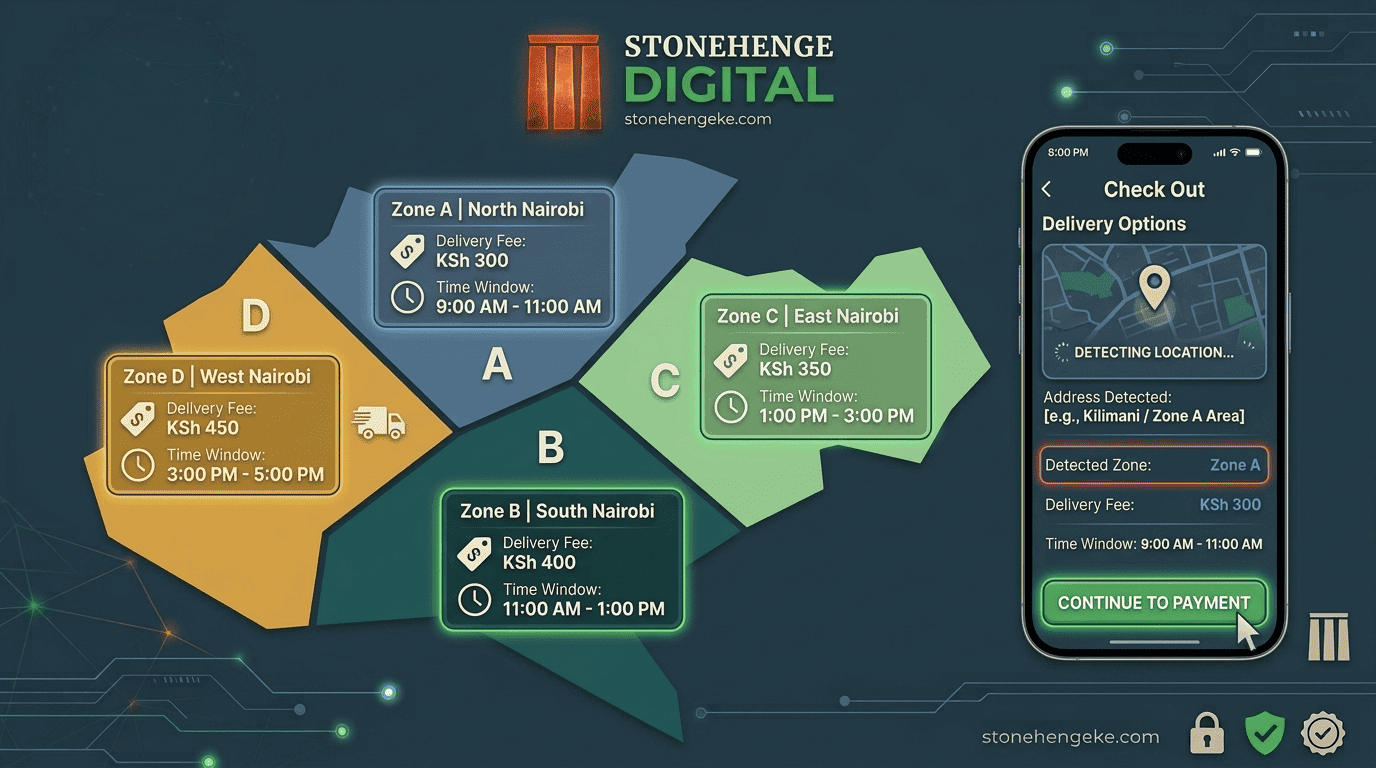
Start by dividing your service area into manageable delivery zones based on distance from your dispatch point, traffic conditions, rider availability, and delivery costs.
For a Nairobi-based online store, you might begin with the following example. Adjust these zones, fees, and time windows to match your actual operations.
Important: These locations, fees, and delivery estimates are examples, not verified service commitments. Some neighbourhoods may fall into different zones depending on your dispatch point, traffic, and route. Map your actual service area before publishing prices.
Step 02
Configure the Zones in Your Dashboard
Once you have mapped your service area, add the zones to your e-commerce system. Each zone should have a defined location list, delivery fee, delivery window, and order cut-off rules.
- Open Delivery Settings in your e-commerce dashboard.
- Select Add Zone.
- Enter the zone name and its supported areas, neighbourhoods, estates, or postal locations.
- Set the delivery fee and any applicable conditions.
- Define the estimated delivery window and order cut-off time.
- Save the configuration and test it using addresses from each zone.
During checkout, ask the customer to provide their delivery location. Your system can use the address, selected area, or supported location lookup to determine the applicable zone and calculate the fee.
Test the boundary areas
If an address cannot be assigned confidently, ask the customer to confirm the location or have staff review it. Do not silently apply a higher fee without explaining the delivery cost to the customer.
Step 03
Set Your Order Cut-Off Times
A cut-off time is the latest time a customer can place an eligible order for a particular delivery window. Set the time based on how long your team needs to confirm payment, pick and pack products, prepare dispatch documents, and arrange a rider.
Do not assume that every order placed before a cut-off can be delivered on the same day. Same-day eligibility may also depend on whether the product is in stock, the payment is confirmed, and a rider is available.
Step 04
Implement the Cut-Off Logic
Your website should apply the cut-off rules consistently across the product page, checkout, order confirmation, and dispatch dashboard.
Check the zone and cut-off time
Determine the customer's delivery zone and compare the order time with the applicable cut-off.
Calculate the next available delivery window
Account for business days, holidays, stock availability, and the earliest realistic dispatch slot.
Update the checkout message
Explain when the order is expected to arrive before the customer confirms the purchase.
Flag the dispatch cycle
Classify the order in your dashboard for the correct delivery date or dispatch batch.
Example checkout banner
Today's delivery cut-off for your area has passed. You can still place your order now, and we will prepare it for the next available delivery window.
Use a clear status such as Next Dispatch Cycle in the dashboard, and make sure that status reflects the actual schedule rather than serving as a substitute for a confirmed delivery date.
Step 05
Communicate Clearly at Checkout
Customers should not have to guess how much delivery costs or when their orders will arrive. Display the relevant information before they submit the order.
Illustrative checkout summary
Your Delivery Details
Delivery area
Westlands, Nairobi
Delivery zone
Zone B
Delivery fee
KSh 250
Estimated arrival
Today, 5 PM to 7 PM
This is an illustrative example. Display the actual delivery fee and available time window calculated for the customer's address and order.
If the customer orders after the cut-off, show the next available date instead of displaying an outdated same-day estimate.
Example late-order message
You are placing your order after today's delivery cut-off. Your estimated delivery date is the next available delivery day, subject to stock confirmation and dispatch availability.
Step 06
Generate a Morning Dispatch List
A well-organised dispatch list helps your team know which orders need to leave the store, which areas can be grouped together, and what each rider is expected to deliver.
If your business opens early, configure the dashboard to prepare a dispatch list before riders leave. For example, you could schedule it for 7 AM, provided the orders and staffing arrangements are ready by then.
Grouping orders by zone helps the team plan routes and reduce unnecessary travel. Where route-planning tools are available, use them to sequence stops based on location, delivery commitments, and rider capacity.
Step 07
Plan for Delivery Exceptions
Not every delivery will fit neatly into a predefined zone or schedule. Give your team a process for handling exceptions without misleading customers or charging unexpected fees.
When an address falls between zones
Ask the customer to confirm the exact delivery location or have staff review it. Explain the applicable delivery fee before the customer places the order. If an address falls outside your standard zones, provide a separate quotation or offer collection if available.
When a customer requests collection
Offer a pickup option when your business has a suitable collection point. Display the pickup address, collection hours, and any required order confirmation details. Remove the delivery charge when no delivery service is being provided.
When a customer needs urgent delivery
You can offer an optional rush delivery service, potentially with an additional fee. Require staff approval, check rider availability, and confirm the actual time window with the customer before accepting the extra charge.
When the rider is delayed
Update the expected arrival time, notify the customer promptly, and record the delivery exception in your dashboard. Clear communication is better than allowing a missed delivery window to become an unexpected disappointment.
The Trust Dividend
Reliability Is Part of Your Product
Customers judge an online store by more than the products it sells. They also notice whether the delivery fee is clear, whether the estimated arrival time is realistic, and whether the business communicates when circumstances change.
Clear expectations
Customers know the fee and likely delivery window before checkout.
Better dispatch planning
Orders can be grouped by area, schedule, and available rider capacity.
More dependable service
Consistent communication helps build customer confidence and repeat business.
A realistic next-day delivery commitment can create a better experience than an ambitious same-day promise that your operations cannot consistently meet.
Build a Delivery System Your Business Can Depend On
Start with a handful of practical delivery zones. Set fees that reflect your operating costs, establish cut-off times your team can meet, and make the expected delivery date visible before checkout.
Then connect those rules to your order dashboard and morning dispatch process. Review delays, failed deliveries, and rider capacity regularly so that your delivery promises continue to reflect how your business actually operates.
Do not simply promise faster delivery. Build a system that delivers reliably.
Ready to Improve Your Online Store?
Bring Delivery Zones and Order Management Together
Stonehenge Digital KE helps Kenyan businesses build e-commerce websites and practical management systems that support order processing, payment collection, and more organised operations. Let's discuss a delivery workflow that fits your business.
Set Up Delivery Zones and Cut-Offs →Stonehenge Digital KE | E-commerce solutions for Kenyan businesses
Interested in E-Commerce Website with M-Pesa?
Let's build this for your business
Sell to any Kenyan with a phone. Full online shop with Safaricom STK Push payment — no card needed.