The Core Skill of Kenyan E Commerce
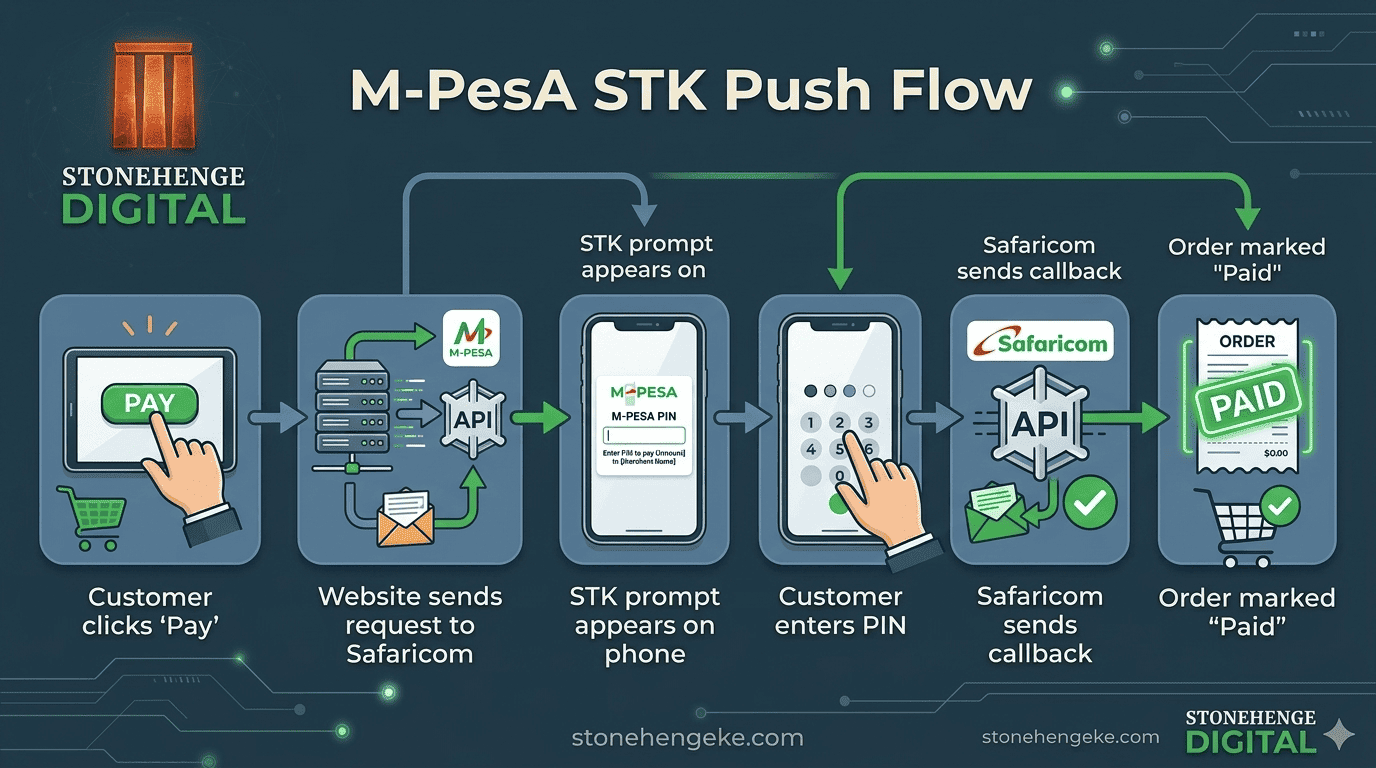
STK Push is the technology behind the M Pesa prompt that pops up on a customer's phone when they pay on your website. Integrating it is the single most important technical skill for Kenyan e commerce.
This tutorial walks you through the process step by step. It is a technical guide, so if you are not comfortable with code, share it with your developer or hand the whole job to a specialist.
What you are building
The integration has one job: ask Safaricom to prompt a customer's phone for payment, then receive confirmation back and update the order. Everything in the eight steps below serves that single loop.
- Create a Daraja account and verify it
- Create an app and select Lipa Na M Pesa Online
- Collect your credentials securely
- Wire the server endpoint and the STK request
- Handle the callback and update the order
Create a Safaricom Daraja account
- Go to
developer.safaricom.co.ke. - Click sign up and create an account.
- Verify your email address.
- Log in to the Daraja portal.
Nothing technical here, but use a business email address you will still control in two years. The Daraja account becomes part of your production infrastructure.
Create an app
- In the Daraja dashboard, click My Apps and then Create New App.
- Give it a clear name, for example MyStore Checkout.
- Select the APIs you need. For STK Push you need Lipa Na M Pesa Online.
- Click create.
You will now receive three pieces of information. Treat all three as secrets.
Get your Paybill or Till number
If you are using a Paybill, you need the following details ready before you write any code.
- Business Short Code, which is your Paybill number.
- Lipa Na M Pesa Online Short Code, usually the same number.
- Initiator Name and Password, required for some APIs.
Set up your server endpoint
Your website needs a server side script to handle five things in order. Each one must complete before the next begins.
- Receive the order details from the customer
- Generate an OAuth token from Safaricom
- Send the STK Push request to Safaricom
- Receive the callback from Safaricom with the payment result
- Update the order status in your database
// 1. Get access token
$token = getAccessToken($consumerKey, $consumerSecret);

// 2. Prepare STK request
$stkRequest = [
    'BusinessShortCode' => '174379',
    'Password' => base64_encode($shortcode . $passkey . $timestamp),
    'Timestamp' => $timestamp,
    'TransactionType' => 'CustomerPayBillOnline',
    'Amount' => $amount,
    'PartyA' => $phoneNumber,
    'PartyB' => $shortcode,
    'PhoneNumber' => $phoneNumber,
    'CallBackURL' => 'https://yourbrand.co.ke/mpesa/callback',
    'AccountReference' => 'ORD-1099',
    'TransactionDesc' => 'Order Payment'
];

// 3. Send to Safaricom
$response = sendSTKPush($stkRequest, $token);

// 4. Handle callback
// Safaricom will POST to your CallBackURL with payment status
AccountReference is how you connect a payment back to an order later. Use your own order number, not a random string, or reconciliation becomes guesswork.
Handle the callback
The callback is where Safaricom sends the payment result. You need a route such as yourbrand.co.ke/mpesa/callback that receives the POST data and updates your order.
- ResultCode 0 means success. Anything else means failure.
- MpesaReceiptNumber The unique M Pesa transaction ID.
- Amount The amount actually paid.
- PhoneNumber The customer's number.
On success, update the order to paid and trigger the fulfilment workflow. On failure, log the error and optionally retry.
ResultCode of 0. Update orders from the callback, not from the browser.
Test in the sandbox
Before going live, test in the Daraja sandbox environment. Use the sandbox credentials and the test phone numbers Safaricom provides. Simulate both successes and failures, and verify that your order management handles both cases correctly.
Where you learn
- Uses test credentials from the Daraja portal
- Uses Safaricom's test phone numbers
- No real money moves
- Safe place to simulate failures
- Shortcode 174379
Where money moves
- Uses production credentials only
- Real customer phone numbers
- Real payments and real receipts
- Failures now have a cost
- Requires Go Live approval first
Go live
- Apply for Go Live in the Daraja portal.
- Safaricom reviews your app and grants production credentials.
- Replace sandbox credentials with production credentials.
- Test with a small real payment, around KSh 1.
- Confirm the callback updates your order correctly.
Add resilience features, recommended
Real networks fail in ordinary ways. These three additions handle timeouts and dropped connections without losing the sale.
You have done it
If you have followed these steps, you now have a working STK Push integration. It is not simple, but it is essential, because it is how money actually reaches the business.
A quick check before you call it finished
- Credentials are stored in environment variables, not in the codebase
- The consumer secret never reaches the browser
- The AccountReference matches your real order number
- The callback route is publicly reachable over HTTPS
- Failed payments are logged with enough detail to investigate
- Success updates the order from the callback, not from the browser
- Retries cannot create duplicate orders
STK Push is the core skill of Kenyan e commerce. Eight steps, one loop, one confirmation that decides whether an order becomes revenue.
Build it in the sandbox, test the failures as carefully as the successes, then go live with a KSh 1 payment you watch end to end.
Rather not build it yourself?
Stonehenge Digital builds STK Push checkouts with secure credential handling, reliable callback processing and resilience features that handle real network failures.
Let Us Handle My M Pesa Integration →Interested in E-Commerce Website with M-Pesa?
Let's build this for your business
Sell to any Kenyan with a phone. Full online shop with Safaricom STK Push payment — no card needed.