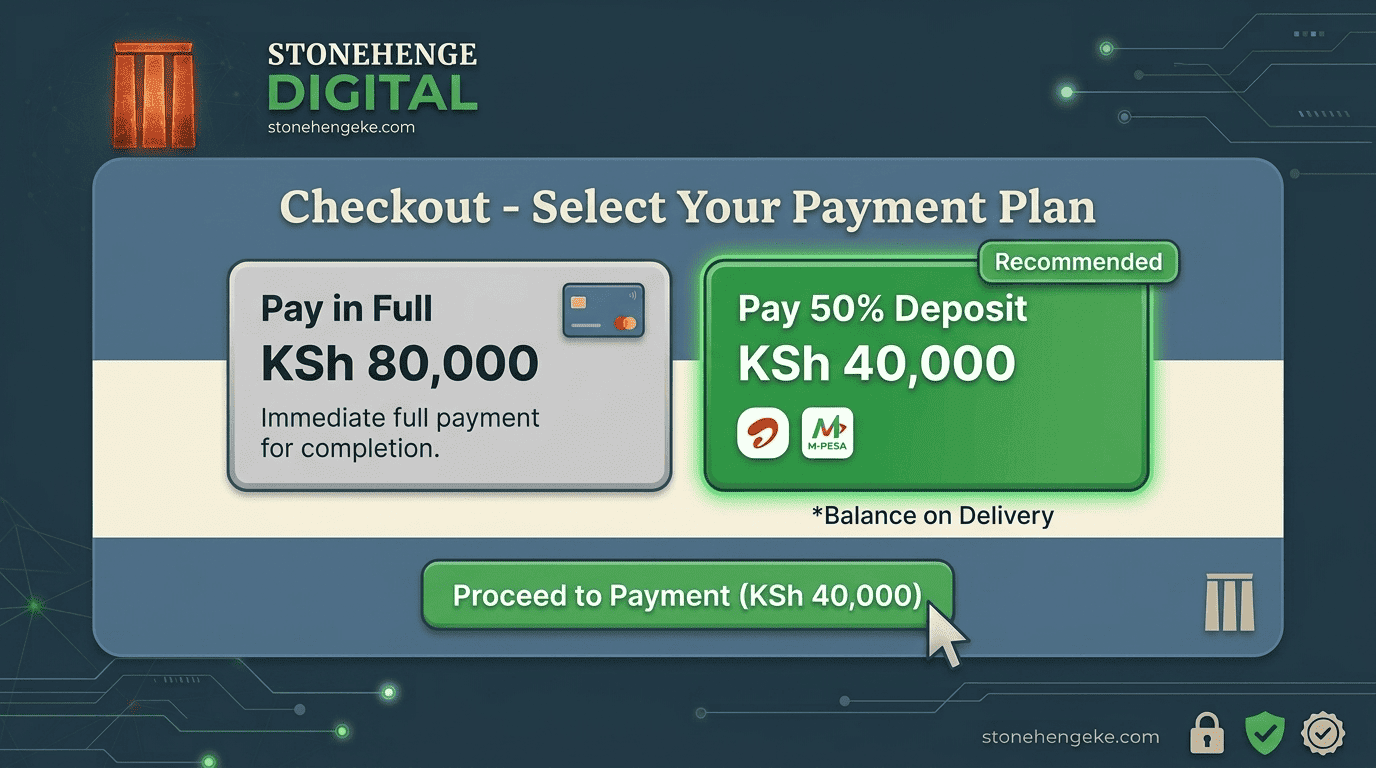
E-Commerce | Flexible Payments
Why High-Ticket Items Need Deposits
Imagine a customer browsing your online store and finding exactly what they need: a sofa, a refrigerator, office furniture, or another product worth KSh 80,000. They are interested, but paying the entire amount upfront to a business they have never purchased from can feel like a major risk.
A deposit option gives customers another way to commit to their purchase. Instead of paying the full amount immediately, they pay an agreed portion upfront and settle the balance at delivery, subject to your delivery and payment terms.
A simpler way to buy
Lower the upfront commitment. Make the buying process feel more manageable.
Example product price
KSh 80,000
50% deposit
KSh 40,000
Balance at delivery
KSh 40,000
In this tutorial, you will learn how to structure deposit payments, track outstanding balances, prepare delivery notes, coordinate riders, and remind customers when their balances are due.
Step 01
Configure Your Checkout Options
On your product page and checkout, present two clear payment choices. Customers should understand exactly how much they will pay now and how much will remain due.
Use clear labels and make both options easy to understand. You can highlight the deposit choice visually, but only use a badge such as "Recommended" when it genuinely reflects your business's preferred or most suitable option.
Remember: The deposit percentage should be configurable for your business. A 50% deposit is an example, not a requirement for every product or order.
Step 02
Build the Deposit Payment Flow
Once the customer chooses the deposit option, your checkout should calculate the required amount, process the initial payment, and keep the outstanding balance attached to the order.
- The customer selects Pay 50% Deposit.
- Your system calculates 50% of the total order value.
- An STK Push is initiated for the deposit amount only.
- After the payment is confirmed, the order status becomes Deposit Paid, Balance Pending.
- The customer receives a confirmation showing the total price, amount paid, outstanding balance, and expected delivery information.
Keep the numbers transparent
If a product costs KSh 80,000 and the customer pays a KSh 40,000 deposit, the remaining balance is KSh 40,000 before any separately disclosed charges or adjustments.
Your system should update the balance only after verifying the successful payment. A payment request being sent is not the same as a confirmed payment.
Step 03
Generate a Delivery Note
When the order is ready for dispatch, your business dashboard should generate a delivery note that helps the rider, customer, and office team agree on what is being delivered and what remains to be paid.
A well-designed delivery note reduces confusion, prevents collection mistakes, and gives your team a record of the agreed payment amount.
Step 04
Establish a Clear Rider Workflow
Riders should have a straightforward process for delivering deposit-paid orders and recording the final payment. The process can be managed using a printed delivery note, a mobile app, or your business dashboard.
Deliver the correct product
Check the order number, product description, customer details, and delivery address.
Allow the agreed inspection
Give the customer a reasonable opportunity to inspect the product according to your published delivery policy.
Collect the outstanding balance
Accept the payment methods authorised by your business, such as M-Pesa or cash where permitted.
Verify the payment
Confirm that the balance has actually been received. Do not rely solely on a screenshot or an unverified payment message.
Update the order status
Record the final payment and mark the order as delivered and fully paid only after completing the relevant checks.
What if the customer refuses delivery?
Record the reason for the refusal, document the condition of the product, and follow your published cancellation, return, and refund policy. The next steps may depend on whether the product differs from the order, is damaged, or the customer has changed their mind.
Step 05
Publish Clear Deposit Payment Terms
Customers should understand the rules before making a deposit. Display your terms at checkout and include them in the order confirmation so they can refer to them later.
Clear terms protect both the business and the customer by setting expectations before an order is placed. Avoid promising an unconditional forfeiture of a deposit without checking the circumstances and the law that applies.
Step 06
Automate the Balance Reminder
A reminder sent 24 hours before a scheduled delivery gives the customer time to prepare the outstanding balance and ask questions before the rider arrives.
Example SMS reminder
Hi [Name], your order #[ID] is scheduled for delivery tomorrow. Your outstanding balance is KSh [Amount]. Please prepare to pay via M-Pesa to [Till Number] or cash to the rider, where available. Use order reference #[ID]. Asante!
Your messaging system should use the order's actual delivery date and outstanding balance. If the schedule changes, update the customer rather than sending a reminder with outdated information.
Step 07
Track Outstanding Balances in Your Dashboard
Deposit payments become easier to manage when your dashboard separates orders that are fully paid from those that still require collection.
Useful dashboard filters include deposit paid, awaiting dispatch, delivery scheduled, balance outstanding, delivered and paid, cancelled, and refund pending. These views help the sales, finance, and delivery teams know which orders need attention.
The Conversion Impact
Make Expensive Purchases Easier to Commit To
The original account for this article describes a furniture seller that reported an 80% increase in high-ticket order completion after introducing a deposit model.
The business principle
Give customers a clear, trustworthy way to commit to a purchase while keeping your delivery and balance collection process organised.
This reported result is an example, not a guaranteed outcome. Verify the figure against the seller's actual records before presenting it as a documented case study. Results will vary according to product type, pricing, customer trust, delivery arrangements, and the effectiveness of the checkout.
Turn a Complicated Purchase into a Clear Process
Deposit payments can help businesses selling furniture, electronics, appliances, office equipment, and other higher-priced products offer customers greater payment flexibility.
But the payment option is only one part of the solution. Your store also needs accurate balance calculations, verified M-Pesa payments, clear customer terms, reliable delivery records, automated reminders, and a dashboard that tracks every outstanding amount.
Make the payment terms clear, keep the customer informed, and manage every order from deposit to final delivery.
Ready to Sell Higher-Value Products Online?
Add Flexible Deposit Payments to Your Store
Stonehenge Digital KE helps Kenyan businesses build e-commerce websites with M-Pesa integration and practical order management workflows. Let's discuss how to structure payment collection around your products and delivery process.
Set Up Deposits on My Store →Stonehenge Digital KE | E-commerce and business solutions for Kenyan businesses
Interested in E-Commerce Website with M-Pesa?
Let's build this for your business
Sell to any Kenyan with a phone. Full online shop with Safaricom STK Push payment — no card needed.